25 Feb 2026
How I made our AI understand Sling’s data
Written by: Katie Hindson, Data at Sling
I got the request every data person is getting today:
Can we use AI to answer data questions at Sling?
I said yes, probably. I built it. And then, kind of unexpectedly, I became our data bot's most active user.
And now that my AI analyst is handling most of our data requests, I have time to write about how I set the whole thing up. So here it is: a practical guide to context engineering for data teams.
The giant data prompt approach: how we started and why this doesn’t work
The approach we started with (and what I see with a lot of places): write a massive prompt, give all of the table descriptions, maybe a few example queries, and ship it. This works okay for demos, but it breaks down really quickly when your team starts using it in production.
A few reasons for this:
It goes stale. Models change, columns get renamed, new tables appear, etc. A static system prompt can’t keep up.
It doesn’t scale across teams. We’re in the time of multiple bots, workflows, and teams using different LLMs to query data. You end up maintaining a ton of different versions of roughly the same prompt. They drift, they contradict each other, eventually, they just suck.
It’s all-or-nothing. A giant dump of context at the start of every conversation is a waste. Most of it is irrelevant and the model’s attention is limited. Anthropic's effective context engineering blog post, outlines the problem well: given that LLMs operate with a finite attention budget, good context engineering means finding the smallest possible set of high-signal tokens that maximize the likelihood of the right outcome.
The system I built tried to solve all three of these at once (and makes sure data security is cared for - because PII is not bot food 🙅)
Treat context as a data product
The main idea is simple: treat your AI context the same way you'd treat any other data product. Version it. Test it. Document it. Make it queryable.
To do this, I used a combination of .yml, BigQuery tables and GitHub actions.
Context Lives in .yml Files
All of the context I want the AI to have (table descriptions, column definitions, business rules, metric definitions, usage notes, etc.) lives in .yml files in our data repository, with our dbt models.
This wasn't a big jump for us. I already maintained schema.yml files in dbt to document all of our models. I added to them to make them into a purpose-built set of context files. YAML was a natural fit: key-value pairs keep the structure consistent across files, it's human-readable, it's easy to review in pull requests, and it compiles cleanly into JSON.
The key is that there's one source of truth for this content. If a metric definition changes, someone updates the .yml file, opens a PR, and that change flows everywhere automatically.
Context Is Compiled and Stored in BigQuery
On every merge to our main branch, a GitHub Action runs that compiles these .yml files and writes them to BigQuery as JSON blobs. The result is a set of tables in our dbt_prod dataset:
claude_context- top-level company and workflow configurationclaude_table_catalog- descriptions, priorities, rules, and use cases for every tableclaude_column_catalog- column-level definitions, data types, semantic types, and testsclaude_metric_definitions- definitions for business metrics like MAT, retention, and adoption. If you’re using a tool with a semantic layer, like Lightdash, then you’ve already got this out-of-the-box (lucky you).claude_common_patterns- business rules like filtering out staff, time period standards, and SQL conventions
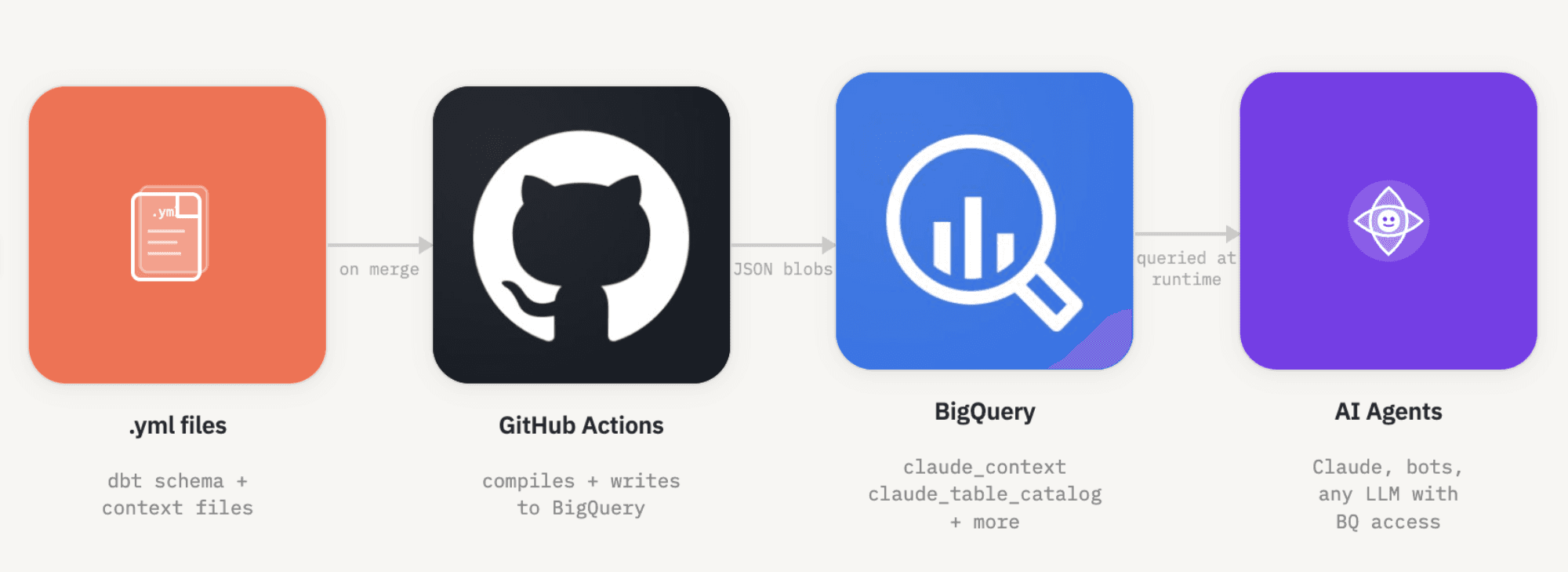
This approach has a really nice property: to query our data, any AI system needs BigQuery access anyway. So storing the context there means it's automatically available to any bot or workflow that's already been granted access. This means no extra infrastructure, no API to maintain, no separate knowledge base to sync.
We now have the shortest data prompt ever
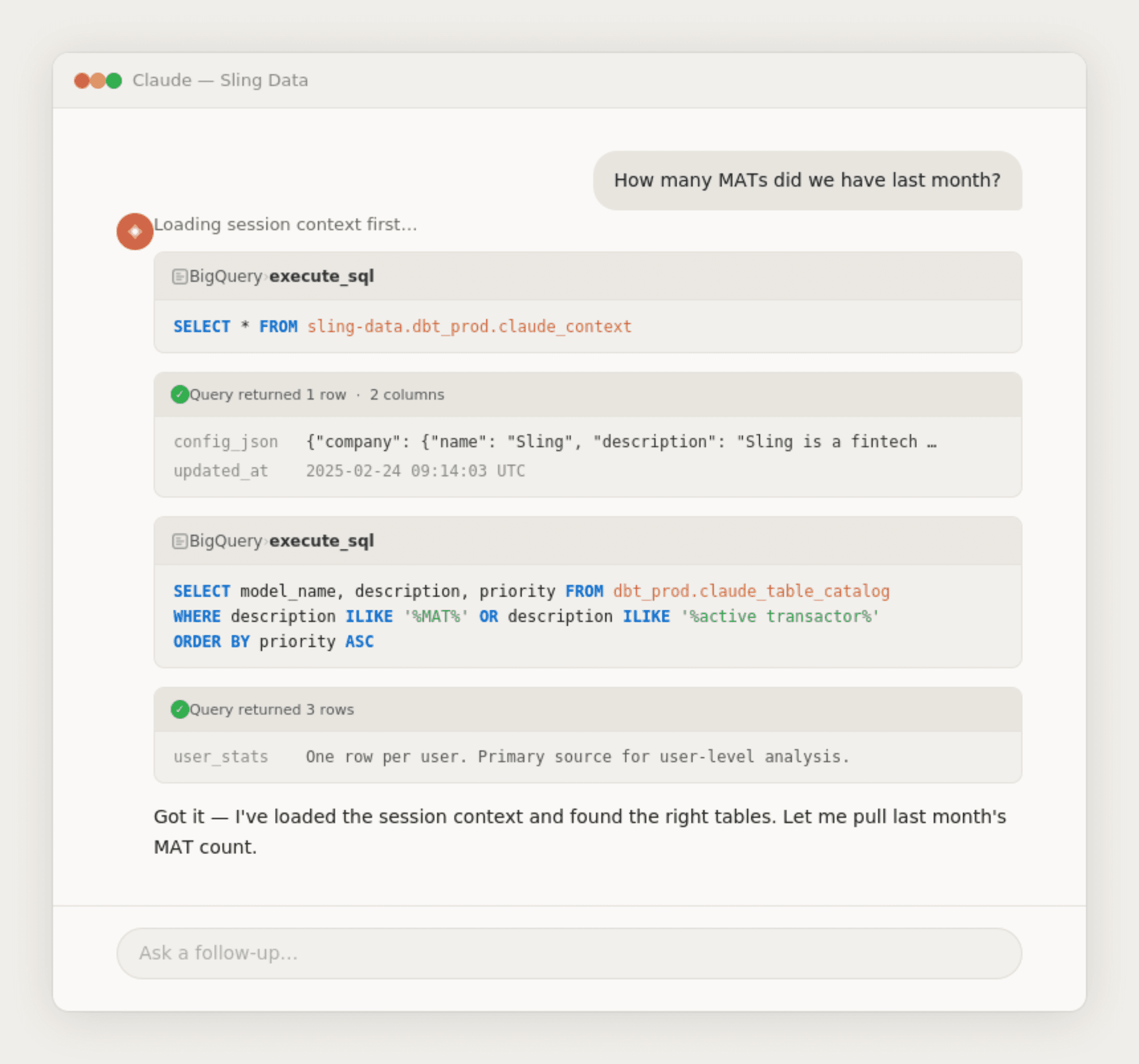
With the context living in BigQuery, the actual system prompt becomes super short:
Before running any query in BigQuery, you must first run this query:
SELECT * FROM sling-data.dbt_prod.claude_context*
That's it. The model fetches its own instructions at runtime. This means:
The system prompt itself almost never needs to change
The context stays current without touching any prompts
You can update, test, and redeploy context changes independently of the AI system itself
Word of the day: Progressive Disclosure (basically, loading context in layers)
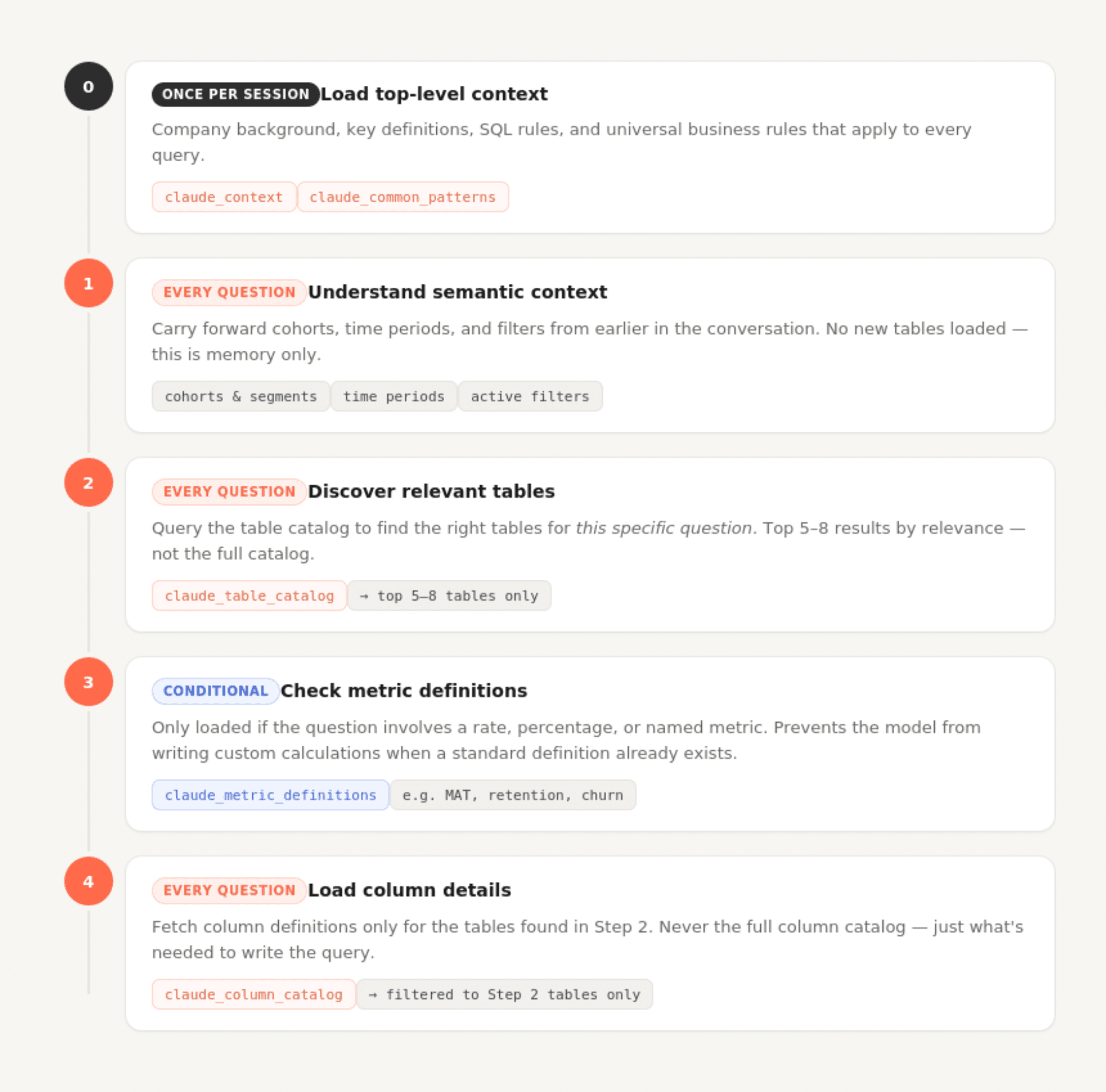
One of the bigger design decisions was not dumping everything into context at once. The claude_context file defines a workflow the model follows for every question:
Step 0 (startup, once per session): Load the top-level context and common patterns. This covers company background, key definitions, SQL rules, and universal business rules that apply to every query.
Step 1 (each question): Understand semantic context. Carry forward cohorts, time periods, and filters from earlier in the conversation.
Step 2 (each question): Query claude_table_catalog to find the right tables for this specific question. Rather than loading all table documentation upfront, the model searches for relevant tables dynamically.
Step 3 (conditional): If the question involves a rate, percentage, or named metric, check claude_metric_definitions before writing any custom calculations.
Step 4 (each question): Load column details only for the tables discovered in step 2.
This staged approach means the model's context window at any given moment contains exactly what's needed and nothing more. A question about user signups doesn't load transaction table schemas. A question about transaction volume doesn't load user-level metric definitions.
Data security needs to be by design
One of the requirements I took seriously from the start was making sure AI systems couldn't touch sensitive data, even accidentally.
Our approach is straightforward: raw and PII-containing data lives in separate BigQuery datasets, and service accounts used by AI bots are never granted access to those datasets. The context tables only reference models in dbt_prod (our cleaned, transformed layer) where PII has already been encrypted or removed.
This means the AI can't be prompted or tricked into querying raw user data. The access control is at the infrastructure layer, not the prompt layer. Prompt-level restrictions are always one clever prompt away from failing. IAM permissions are not.
Prioritization: not all tables are created equal
One thing I learned quickly: if you give an AI equal access to every table, it makes bad choices. It might use a staging table when a clean production table exists. It might join two tables that technically work but aren't the right abstraction.
The context files include an explicit priority system for tables (1 = recommended, 2 = supplementary, 3 = raw/internal) and for rules (1 = always apply, 2 = apply unless the question context overrides it, 3 = suggested convention). The model is instructed to start with priority 1 tables and only go deeper if needed.
This mirrors something data teams do naturally when onboarding a new analyst: "Use this table. If you can't find what you need, check these. Don't touch those." Making that guidance machine-readable means the AI follows it consistently.
Big-Wide-Tables are the best. I will die on this hill.
I’m lucky that I loved big-wide-tables in data long before AI came into the picture and this has been a huge help when using LLMs.
We build wide, pre-joined tables for our most common analysis patterns. So, user_stats, for example, is a single table with one row per user, per day, with aggregated data like num_transactions or num_support_requests and other fields that would otherwise require joining across three or four tables.
The benefits for AI-assisted querying are real. Fewer tables means less context the model needs to load. No join logic means fewer opportunities for the model to produce subtly wrong SQL like a LEFT JOIN where an INNER JOIN was needed, a fanout nobody noticed, a filtering condition applied at the wrong stage. If the data is already flat, those mistakes don't happen.
This isn't unique to AI use cases. I think that wide tables are just good data modeling practice. But the payoff when LLMs are involved is super high.
Yes, you need to test your AI.
Any time I make significant changes to the context files or how our data AI bot “works”, I run a set of test questions against the system before deploying the changes.
I have a small dataset of question-and-expected-answer pairs that cover the most common query patterns: user counts with standard filters applied, retention calculations, transaction aggregations by country, etc.. If the AI's SQL output changes a lot on these tests after a context update, that tells me that something hasn’t worked as expected.
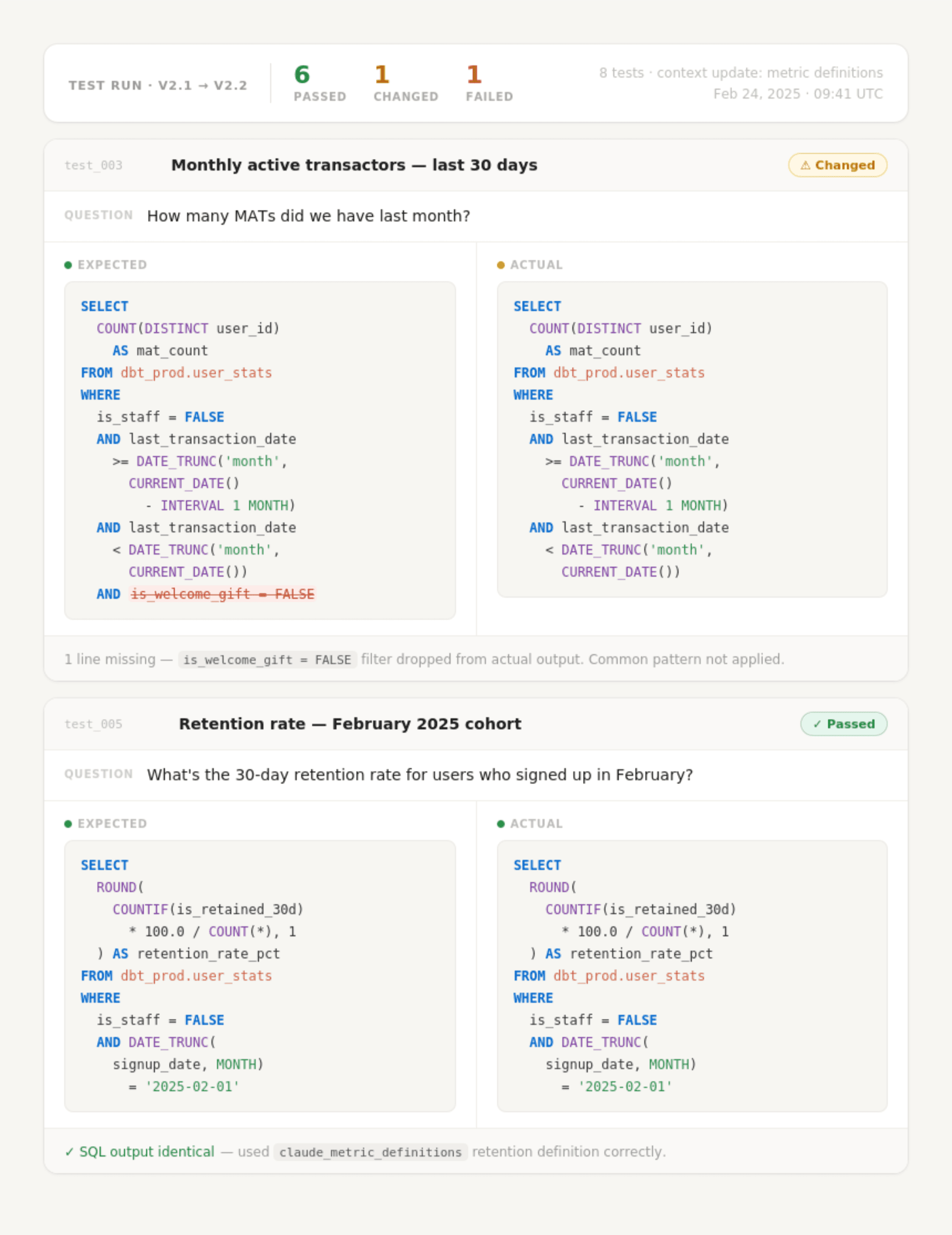
This isn't a legit evaluation framework (yet), but having even a lightweight testing habit makes iterating much safer (especially now that the whole company is using my system for any AI-generated data queries). Context engineering is not an art, it's a science. It’s empirical and I don’t think you can just reason your way to the right structure, you have to test it.
This approach could be obsolete in 6 months. That's fine.
One thing I'm deliberate about: this entire system should be replaceable without a lot of faff.
Context windows are getting bigger every few months. Prompting techniques that work well today may be replaced by something better-understood next year. New model capabilities change what's worth putting in context versus what the model can infer. The way I've structured metadata in YAML files might not be the most effective format six months from now.
So I've tried to keep the system loosely coupled:
The
.ymlsource files are what structures the format of the context. The BigQuery tables are just a compiled output. They’re easy to recompile in a different shape.The GitHub Action that builds the context tables is simple and easy to swap out.
The system prompt is intentionally minimal. Changing how context is loaded doesn't require rebuilding the prompt.
If a better approach to context engineering emerges (and it will) I want updating this system to feel like a refactor, not a total rewrite.
Why Data People should be great context engineers
Context engineering is basically the problem of taking a large, messy information landscape and producing an accurate, understandable summary that enables better decisions, faster. That is quite literally what data teams do. We use data to help people make better decisions, faster.
When we build a model, we're deciding what information is important enough to surface and what's noise. When we write a dbt schema file, we're encoding business context into machine-readable form. When we define a metric, we're creating a shared language for the organization. All of that is context engineering. We just called it something else.
The tools are different. The customer is an LLM instead of a BI tool or a downstream analyst. But the skill of taking ambiguous, sprawling data and producing high-signal, structured context that feeds good decisions is one data teams have been developing for years.
If you're on a data team thinking about how to make AI useful for your organization, you're probably closer to solving this than you think.